



4.2 Getting Started with HNN and ERP Simulations
GUI Video Walkthrough
API Walkthrough
Using the HNN Python API
Import HNN and Instantiate a Model
Once you've set up your hnn-core environment, you are
ready to use HNN's Python API. The very first thing you'll want to do
(after activating your environment) is to import the
hnn_core package
We'll also import one of the default models,
neymotin_2020_model, which is the laminar SI model
originally presented in (Jones et al., 2009) and using the
implementation from (Neymotin et al., 2020).
                            import hnn_core
from hnn_core import neymotin_2020_model
The HNN Python API is designed around the network object, which we will interact with to set parameters, run simulations, view simulation outputs, and more.
We can create an instance of the default
neymotin_2020_model by assigning it to a variable, such as
net_default.
net_default = neymotin_2020_model()
Interacting with the Network Object
We can then interact with the network object by using
its available attributes
For example, the code block below will print the public-facing methods and data attributes that are available. For simplicity, we will only print the "public" attributes. There are additional "private" attributes that advanced users may want to interact with
                            # get all available attributes
attributes = dir(net_default)

# get the available *methods* (functions) that act on the network object
methods = [
    attr
    for attr in attributes
    # limit to attributes that *are* callable
    if callable(getattr(net_default, attr))
    and
    # exclude "private" attributes
    not attr.startswith("_")
]

# get the available *data attributes* that are associated with the
# network object
data_attributes = [
    attr
    for attr in attributes
    # limit to attributes that *are not* callable
    if not callable(getattr(net_default, attr))
    and
    # exclude "private" attributes
    not attr.startswith("_")
]

# print public methods
print("Methods:")
print(*methods, sep=", ")

# print public data attributes
print("\nData attributes:")
print(*data_attributes, sep=", ")
We can then use these attributes with the network object we instantiated previously
First, let's try examining one of the network's data attributes:
cell_types. We can check the object's type so
we know how to interact with it
                            # check the `net.cell_types` object's type
print(f"Object type: {type(net_default.cell_types)}")
Now that we have confirmed the net.cell_types object is
a dictionary, we know how to ineract with it using native Python
code
Next, let's print the dictionary's keys, which in this case will tell us the unique cell types in the network
                            print("Cell types:")

# loop through the dictionary keys and print them
for key in net_default.cell_types.keys():
    print(f"\t{key}")
Let's examine one of these cell_types objects in more
detail. We'll use "L5_pyramidal" as an example, and we'll assign it a
variable for easier access
                            # assign net_default.cell_types["L5_pyramidal"] to a variable
l5_pyr_celltype = net_default.cell_types["L5_pyramidal"]

# check its type
print(type(l5_pyr_celltype))
Once again, we have a dictionary. We can loop through it and print the dictionary keys and values to better understand the object's data structure
                        for key, value in l5_pyr_celltype.items():
print(f'Key: "{key}"')
print("Value:")
print(f"   Type:  {type(value)}")
print(f"   Value: {value}")
print("\n" + "-" * 20 + "\n")
We can see that this yields another dictionary with two keys. The
first is "cell_object", which contains a class called
hnn_core.cell.Cell. We will explore this class further in
upcoming sections
The second is "cell_metadata", which contains a dictionary with information about the "L5_pyramidal" cell type.
Visualizing the Network and Cell objects
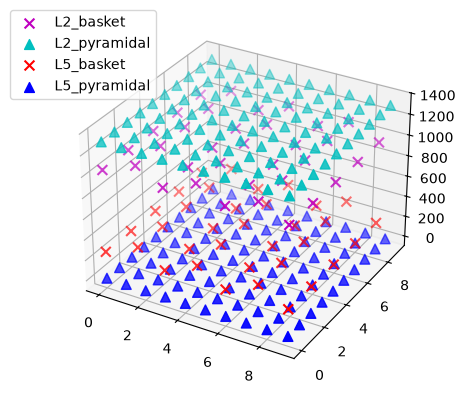
Next, let's try using one of the network's methods:
plot_cells(). This will plot a diagram of the network that
shows all of the cell types in a 3D grid
                            # we can plot a diagram of the network using the .plot_cells() method
_ = net_default.plot_cells()
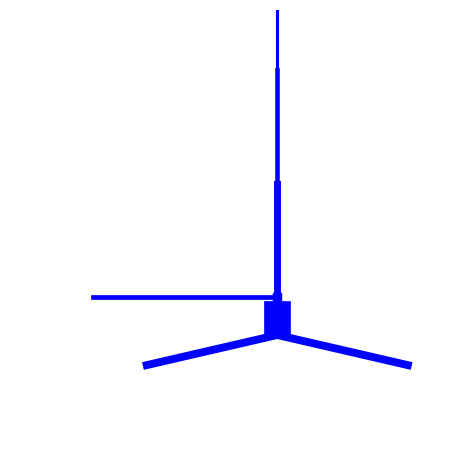
The hnn_core.cell.Cell class also contains its own set
of methods and data attributes. For example, we can plot the morphology
of the "L5_pyramidal" cell using the .plot_morphology()
method
                            # using the variable we created above, we can access the `Cell` class
# object and plot its morphology

# remember: l5_pyr_celltype is a dictionary, so we need to use the
# "cell_object" key to access the `Cell` class for plotting

_ = l5_pyr_celltype["cell_object"].plot_morphology()
References
Jones, S. R., Pritchett, D. L., Stufflebeam, S. M., Hämäläinen, M. & Moore, C. I. Neural correlates of tactile detection: a combined magnetoencephalography and biophysically based computational modeling study. J. Neurosci. 27, 10751–10764 (2007). https://doi.org/10.1523/JNEUROSCI.0482-07.2007